

Someone on your team will soon ask a simple question. "Can I just ask Claude about our water mains?" Or ChatGPT, or Copilot. The honest answer used to be no. The AI could not reach your GIS.
That is changing. Esri is adding support for MCP across ArcGIS. This post explains what MCP is, what an assistant can and cannot see, and the prep work to do before you turn it on.
What is MCP, in plain words?
MCP stands for Model Context Protocol. It is an open standard. It sets one common way for an AI assistant to connect to outside data and tools.
Think of it as a universal plug. Before MCP, each AI product needed its own custom link to each system. With MCP, ArcGIS offers one plug, and any assistant that speaks MCP can use it.
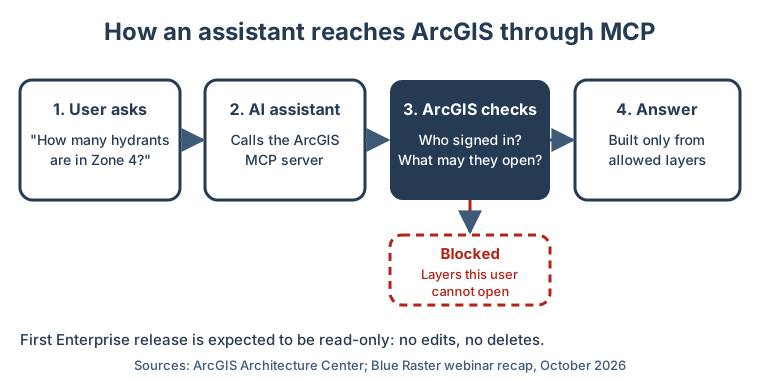
In ArcGIS terms, the plug is called an MCP server. The assistant sends a request, such as finding an address or counting the hydrants in one zone. The server runs the matching ArcGIS tool and sends back the answer.
What did Esri release, and what is coming?
Here is the timeline so far. Dates in the future are expected, not promised.
- June 29, 2026: MCP for ArcGIS Location Services went to beta. It covers four services: geocoding, routing, elevation and static maps. Esri says the MCP link itself adds no extra charge. You still pay the normal rate for each service you use.
- November 2026 (expected): MCP for ArcGIS Enterprise. This date comes from Blue Raster, an Esri partner, in its October 2026 webinar recap. It lists Enterprise 11.1, 11.3, 11.5, 12.1 and 12.2 on Windows and Linux, plus Enterprise on Kubernetes 12.2.
- By the end of 2026 (expected): the Location Platform MCP leaves beta, per the same partner report.
Esri's own ArcNews says the company is working toward MCP across ArcGIS Enterprise, ArcGIS Online and ArcGIS Location Platform. It gives no dates.
What can an assistant do with it?
Blue Raster ran a demo with ChatGPT and Claude. The assistant searched an ArcGIS portal, queried layers and ran tools from plain-language requests. In one site search, it narrowed 43,032 parcels in Delaware County, New York, down to two sites. It showed its reasoning at each step.
For a busy manager, that means fewer "can you pull this for me?" emails to the GIS team. Staff can ask a question in words and get a map-based answer.
What can the assistant see, and what can it not?
This is the question your IT and legal teams will ask first. Esri's architecture guide gives a clear answer for ArcGIS assistants. They work within the data and tools the user can already reach. An assistant cannot see content the user cannot see. It cannot run tasks the user is not allowed to run.
The same guide says agents that connect from outside, like an MCP setup, need the same identity and access controls. So your current sharing rules do most of the work. Ask Esri or your partner to confirm how sign-in works in your release before you go live.
| Question | What Esri and its partner report say |
|---|---|
| Can it read layers the user can open? | Yes |
| Can it read layers the user cannot open? | No |
| Can it edit or delete features? | No, read-only at first |
| Does it need a new permission system? | No, it uses your ArcGIS sharing rules |
| Are prompts used to train AI models? | Not without your consent, per Esri |
| Does it work fully offline? | No, Esri assistants need a link to ArcGIS Online today |
Where can it go wrong?
The weak spot is not the AI. It is how people sign in.
Many offices use one shared "service account" for apps and scripts. That account often can see almost everything. If an assistant signs in with that account, it sees everything too. The permission check still works. It just checks the wrong person.
Three other risks to plan for:
- Bad metadata gives bad answers. Esri's guide says well-described items, clear field names and good tags give better answers. A layer called "Final_v3_copy" with no notes will confuse a person and an AI alike.
- Old layers get found. An assistant searches your whole portal. Stale copies and test layers may show up in answers.
- Costs can creep. Esri notes that some assistant actions may use ArcGIS Online credits. Location services also bill per use.
What prep work should you do now?
The first Enterprise release is expected to be read-only. That is a gift. It gives you time to get ready before the assistant can change anything.
- List what you would share. Pick five to ten layers that staff ask about most. Start there, not with the whole portal.
- Clean their metadata. Write a plain summary, a description and tags for each item. Add clear field names and notes.
- Hide or delete old copies. Archive test layers and stale exports so they do not show up in answers.
- Check who can see what. Review sharing on each layer. Make sure people sign in as themselves, not through a shared account.
- Turn it on for a small group. Esri uses a role privilege for assistants. They are off by default. Start with one team, watch how they use it, then grow.
- Track the bill. Check your credit use weekly during the pilot.
How does GeoLink help?
We use this kind of AI every day. Our own website assistant runs on Claude, by Anthropic, through Amazon Web Services (Bedrock). We know where these systems help and where they need limits.
Our engineering team sets up a read-only pilot with you. We pick the first layers, clean their metadata and check the sharing. Then we connect one assistant for one team.
Sign-in is where we start. On our Web GIS Inspection Platform, staff sign in with the city's own login through a secure standard called OAuth PKCE. There are no shared service accounts. Each person sees only what they are allowed to see. That is the same base an MCP pilot needs.
What should you do next?
Do not wait for November to start. The prep work does not depend on the release date.
This week, pick the five layers your staff ask about most. Open each one and read its description as if you were new. If you cannot tell what it is in ten seconds, an assistant will struggle too.
Then book a free 30-minute audit. We will look at your portal, your sign-in setup and your top layers. You will leave with a short list of what to fix before you let an assistant in. If MCP is not a fit for you yet, we will say so plainly.