
Your assessor's office cannot visit every property every year. There are too many parcels and too few staff. So who gets a visit? Most offices still pick by age, by neighborhood, or by complaint. That works, but it misses things.
Utah County tried another way. It let AI look at aerial photos first. Then people looked only where the AI pointed. This post explains what happened, what the AI really does, and what a small office needs to try it.
What did Utah County actually do?
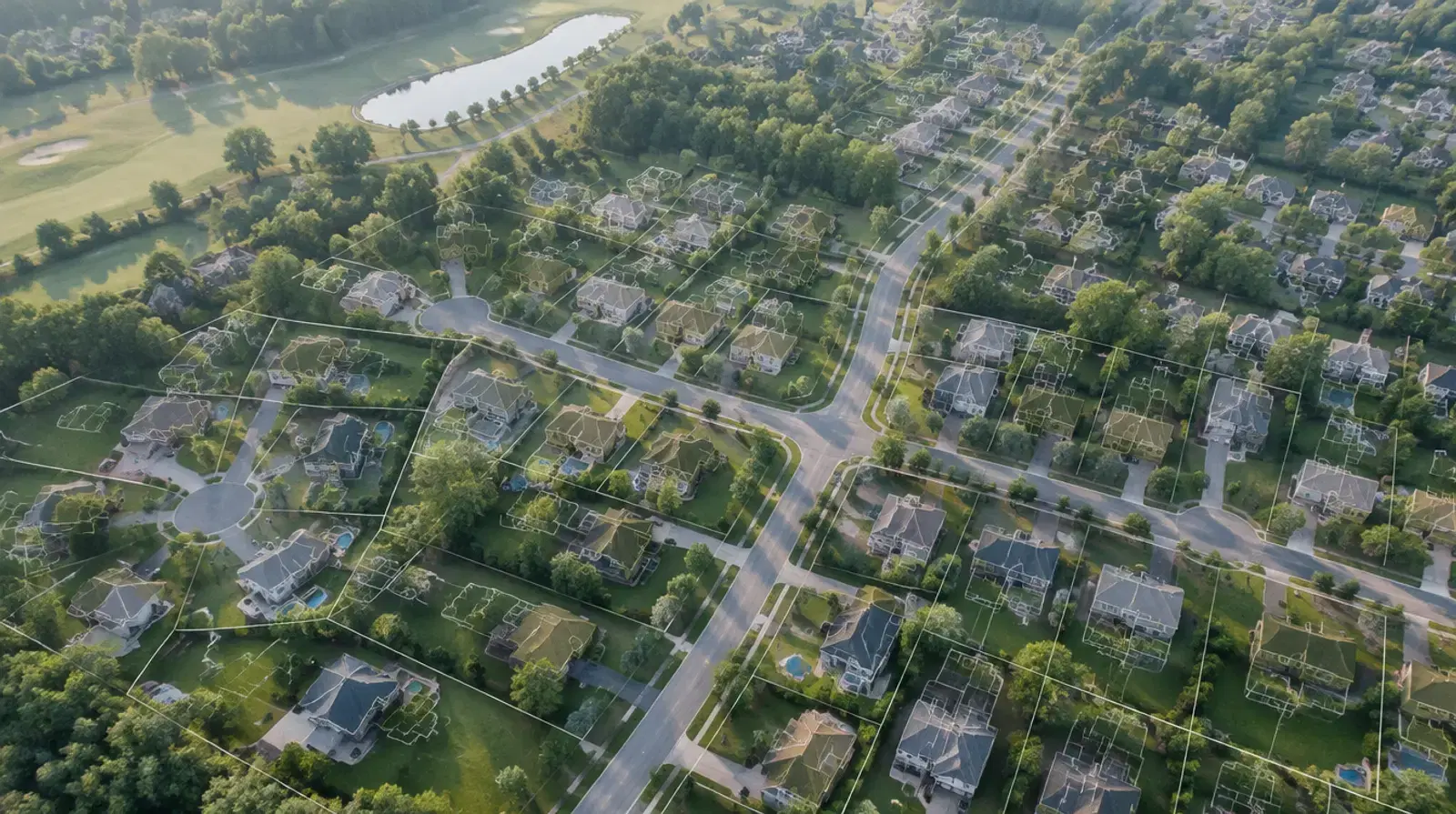
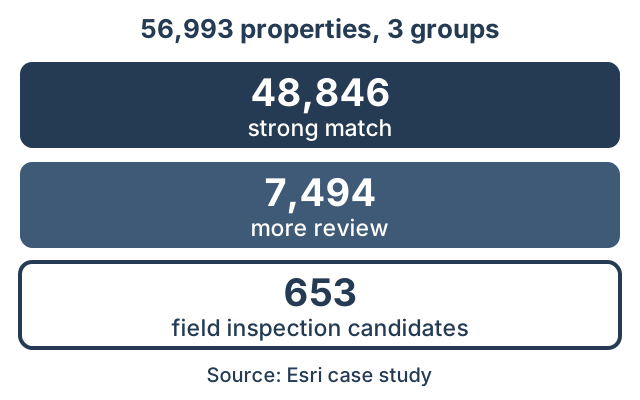
The county had 56,993 properties near a reassessment deadline. The AI looked at high-resolution aerial imagery and found the building outlines. Then it compared them with the assessor sketches. The question was simple. Does the picture match what the record says?
Every property landed in one of three groups:
- 48,846 properties were a strong match, about 86% of the total.
- 7,494 properties needed more review.
- 653 properties were high-priority candidates for field inspection.
So the AI did not send crews to 56,993 properties. It flagged 653 as the best candidates for a visit. The strong matches needed no extra work.
What does the AI do, in plain words?
Think of it as a very fast second pair of eyes. It looks at an aerial photo of a parcel. It finds the building outlines. Then it checks them against the sketch in your record.
A match means the photo and the record agree. A mismatch means something is off. Maybe a garage was added. Maybe a shed is gone. Maybe the record shows a building that the photo does not.
The AI does not set a value. It does not decide anything. It only sorts parcels into "looks fine" and "look again." That sorting is called triage. The word comes from emergency rooms, where staff sort patients by urgency.
Why not just visit everything?
Time and money. A field visit takes a person, a vehicle, and a few hours. Do that for tens of thousands of parcels and the deadline passes first.
Triage changes the math. A small share of parcels carry most of the risk. If you find those first, your crews spend their days where it counts. In Utah County, 653 parcels out of 56,993 came up as high-priority candidates. That is about 1.1% of the total.
What imagery do you need?
You need recent aerial photos that are sharp enough to see buildings. Many offices already have them.
One public source is NAIP, the National Agriculture Imagery Program. USGS EROS distributes it. It covers the lower 48 states. Since 2018 the standard resolution is 0.6 meters. Fresh imagery now comes on a cycle of no more than three years.
That is good enough to see most houses and many outbuildings. It may be too coarse for small items. Some counties buy sharper imagery for that reason. Ask what your office already owns before you buy anything.
What are the limits?
Be careful with the headline numbers. The Utah County story comes from Esri, a software vendor. Vendors write case studies to show their tools in the best light. The numbers look sound, but no independent review backs them up.
Here are three limits to keep in mind:
- Photos show roofs, not the inside of a building. A finished basement stays invisible.
- Old imagery means old answers. A photo from two years ago cannot see last spring's addition.
- A flag is not a finding. Every flagged parcel needs a person to confirm it.
Also, the Utah story does not say what the extra value was worth. Do not promise your board a revenue number before you run your own test.
How can you test this in your own county?
Start small. Pick one district. Use the imagery you already have.
- Choose a district with a few thousand parcels.
- Run the AI check against your assessment records.
- Count how many parcels it flags.
- Send a crew to a sample of the flags. Count how many were real changes.
The last step matters most. It tells you how often a flag is right. If most flags are real, the tool saves you trips. If most are noise, adjust the settings or skip it.
Keep a record of the time it takes. Compare that to the time a normal pass takes. That gives you a real number for your own board.
What happens to the flagged parcels?
This part gets less attention than the AI. A flag is only useful if someone can act on it fast. The crew needs the list on a phone or tablet, with a map, the record, and the photo side by side. They need a way to log what they find. They need that log to land back in your system.
If the flags live in a spreadsheet, the savings leak away. Staff copy rows by hand. Photos get lost. Nobody knows which parcels are done.
How do we do it at GeoLink?
We build the field side. The flagged parcels go into a field inspection app, on ArcGIS or on the city's own stack. A person checks each one on site and logs the result.
We have built this kind of app before. On our POSM GIS Enterprise project, inspectors see thousands of inspection assets on one live map. Crews outside coverage keep working on offline maps.
Your office keeps its own accounts and its own data. We set up the workflow and train your staff to run it.
What should you do next?
Do not start with the AI. Start with a list of what you already have. Write down your imagery, its date, and its resolution. Write down where your assessment records live. Write down how crews log their visits today.
With that list, a free 30-minute audit can tell you quickly whether a triage test makes sense for your office. We will tell you plainly if it does not.