
Your team may have built a search tool or a chat assistant on AWS. Maybe it finds policies in a document library. Maybe it answers staff questions about permits. Then a notice says the service is in "maintenance mode." Does it stop working? Do you need to rebuild it now?
The short answer is no, it does not stop. But there is a catch that hits new AWS accounts. This post explains what the label means, which AI services got it, and how to plan a move without a rush.
What does AWS maintenance mode mean?
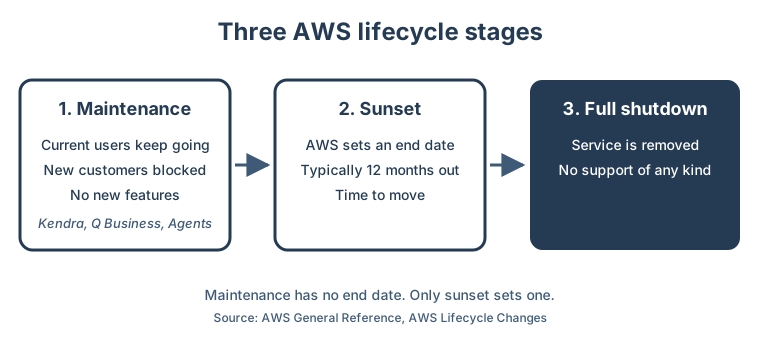
AWS uses three words for services near the end of their life. They are steps, not one event.
| Stage | Can new customers start? | Does it keep running? | What you should do |
|---|---|---|---|
| Maintenance | No | Yes, with support and fixes, but no new features | List where you use it and plan a move |
| Sunset | No | Yes, until a set end date, typically 12 months out | Move before the end date |
| Full shutdown | No | No, it is removed | Nothing left to run |
So maintenance is the gentle stage. AWS says current users can keep going. It still runs and supports the service. It just stops adding anything new.
Which AI services moved to maintenance in 2026?
On June 30, 2026, AWS posted a long list. From July 30, these services closed to new customers:
- Amazon Kendra, an AI search engine for company documents.
- Amazon Q Business, a chat assistant that answers questions from company data.
- Amazon Bedrock Agents, now renamed Bedrock Agents Classic. An agent is an AI that can take steps, like looking up a record, not just answer.
- SageMaker geospatial, a set of map and satellite image tools for machine learning.
AWS posted a second batch on September 29, 2026. Two more services close to new customers on October 29, 2026. They are the Amazon Chime SDK SIP Media Application and Amazon WorkSpaces Secure Browser. The same notice moved four services into sunset. One of them, Amazon DevOps Guru, ends support on September 30, 2027.
AWS now posts these lists every few months. Each one can touch a tool your team depends on.
Will my current AI search stop working?
No. AWS says existing users can keep using these services. For Bedrock Agents Classic, AWS says it has no migration deadline and no planned end date.
Also, Amazon Bedrock itself is not in maintenance. Bedrock is the AWS service that runs AI models. AWS says Bedrock models, Knowledge Bases and Guardrails are not affected. Only the older agent layer is.
Why can a new AWS account lose access?
This is the part that catches teams. The block works per AWS account, not per company.
An AWS account is one billing and security container. Many organizations have several: one for live systems, one for testing, one for backup. For Bedrock Agents Classic, AWS keeps an allowlist. That is a list of accounts still allowed in. An account is on it only if it used Bedrock Agents in the past 12 months.
Picture this. Your live account has used agents for a year, so it is fine. Next spring you open a new account for a backup site. You run the same setup scripts. They fail with an "access denied" error. AWS says there is no exception process.
The fix is simple if you plan for it. New accounts should use the newer service AWS recommends.
What is the real cost of staying put?
Staying is safe for now, but the service stops growing. For Bedrock Agents Classic, AWS froze the list of AI models on July 30, 2026. Newer models will come only to its replacement, called AgentCore. Bedrock itself keeps getting new models.
That means your agent ages a little each quarter. It will not break. It just falls behind what your staff see in other tools.
How hard is the move?
It depends on the service. AWS names a replacement for each one, and its own guides show the gaps.
- Kendra to Bedrock Knowledge Bases. A knowledge base stores your documents so AI can search them and answer with sources. Kendra has 32 or more built-in connectors to other systems. The replacement has seven, including S3, SharePoint, Confluence and Google Drive. Other sources need a small job that copies files into S3. Features like spell check and search filters by category need workarounds.
- Q Business to Amazon Quick. You can connect an existing Q Business index to Quick without loading the data again. But the limit is two indexes per region, and AWS says it cannot be raised. In some setups, every Quick user sees every connected index. That can undo access rules you set before.
- Bedrock Agents Classic to AgentCore. AWS says a simple agent takes hours to move. Agents with custom logic or several agents working together take more work.
AWS gives one more tip for Kendra. Run the old and new search side by side. Send both the same questions and compare the results before you switch.
How do you plan the move?
Start with a list, not a rebuild. These five steps fit most teams.
- List every AWS account you have. Include test, backup and old project accounts.
- Find the affected services in each account. Your AWS activity logs, called CloudTrail, show which services each account has called.
- Mark the gaps. Note any account that will need one of these services but has never used it. That account will be blocked.
- Rank by risk, not by date. Maintenance has no deadline. Move the tool that would hurt most if it fell behind.
- Test in parallel. Run the new service next to the old one. Switch only when the answers match or beat the old ones.
One more habit helps. Have someone read the AWS lifecycle page each quarter. AWS also offers an RSS feed for it. Five minutes a quarter beats a surprise in a build pipeline.
How do we do it at GeoLink?
We build on AWS, and we watch these notices for our own systems too. Our own AI assistant calls Claude models on Amazon Bedrock directly. A smaller Claude model takes over if the main call fails. It does not use Bedrock Agents Classic or Kendra. So the 2026 maintenance changes did not touch it.
That was a design choice. The model name lives in one setting, so we can switch models without a code change. We keep the AI call in one place in our code. When AWS changes a service, we update that one place, not the whole app.
We follow the same rule when we build for clients. Search and AI features sit behind a thin layer we own. Your team keeps its own AWS accounts and data.
What should you do next?
Do not rebuild anything this week. First, write down three things. Which AWS accounts do you have? Which of them use Kendra, Q Business or Bedrock Agents? Will you open new accounts in the next year?
With that list, a free 30-minute audit can show which tools are at risk and what to move first. If nothing needs to change, we will tell you that too.